


As a seasoned supplier of home projector stands, I understand the importance of having a projector stand that can be adjusted smoothly. A well-adjusted projector stand ensures optimal viewing angles, enhances the overall projection experience, and protects your valuable projector equipment. In this blog post, I will share some practical tips on how to adjust the height of a home projector stand smoothly, along with some product recommendations from our range.
Understanding the Basics of Projector Stand Height Adjustment
Before diving into the adjustment process, it's crucial to understand the basic principles behind projector stand height adjustment. The height of your projector stand affects the projection size, image clarity, and viewing comfort. A projector that is too high or too low can result in distorted images, uneven brightness, and neck strain for viewers.
The ideal height for a projector stand depends on several factors, including the screen size, the distance between the projector and the screen, and the seating arrangement in your viewing area. As a general rule of thumb, the center of the projector lens should be aligned with the center of the screen for the best image quality.
Tools and Materials You'll Need
To adjust the height of your home projector stand smoothly, you'll need a few basic tools and materials:
- Measuring Tape: To measure the distance between the projector and the screen and to ensure accurate height adjustment.
- Screwdriver: Depending on the type of projector stand you have, you may need a Phillips or flathead screwdriver to loosen and tighten the adjustment screws.
- Level: To ensure that the projector stand is level and the projection is straight.
- Ladder or Step Stool: If your projector stand is mounted on the ceiling or at a high location, you'll need a ladder or step stool to reach it safely.
Step-by-Step Guide to Adjusting the Height of a Home Projector Stand
Now that you have the necessary tools and materials, let's walk through the step-by-step process of adjusting the height of a home projector stand:
- Determine the Ideal Height: Measure the distance between the projector and the screen and calculate the ideal height for your projector stand based on the screen size and the seating arrangement in your viewing area. You can use an online projector calculator to help you with this calculation.
- Prepare the Projector Stand: If your projector stand is mounted on the ceiling or at a high location, use a ladder or step stool to reach it safely. Make sure the projector is turned off and unplugged before you start adjusting the height.
- Loosen the Adjustment Screws: Use a screwdriver to loosen the adjustment screws on the projector stand. These screws are usually located on the side or bottom of the stand and are used to lock the stand in place at a specific height.
- Adjust the Height: Once the adjustment screws are loose, you can adjust the height of the projector stand by moving it up or down. Use a measuring tape to ensure that the height is accurate and that the center of the projector lens is aligned with the center of the screen.
- Level the Projector Stand: Use a level to ensure that the projector stand is level and the projection is straight. Adjust the height of the stand as needed to achieve a level surface.
- Tighten the Adjustment Screws: Once you have adjusted the height and leveled the projector stand, use a screwdriver to tighten the adjustment screws. Make sure the screws are tight enough to hold the stand in place but not so tight that they damage the stand or the projector.
- Test the Projection: Turn on the projector and test the projection to make sure the image is clear, sharp, and properly aligned. If necessary, make further adjustments to the height or angle of the projector stand until you achieve the desired results.
Tips for Smooth Height Adjustment
- Read the Manufacturer's Instructions: Before you start adjusting the height of your projector stand, read the manufacturer's instructions carefully. Different projector stands may have different adjustment mechanisms and requirements, so it's important to follow the instructions to avoid damaging the stand or the projector.
- Use a Helper: If your projector stand is heavy or difficult to move, it's a good idea to have a helper assist you with the adjustment process. This will make the process safer and easier and will help you avoid dropping or damaging the projector.
- Make Small Adjustments: When adjusting the height of the projector stand, make small adjustments at a time and test the projection after each adjustment. This will help you achieve the desired results more accurately and will prevent you from over-adjusting the stand.
- Keep the Projector Clean: A dirty projector lens can affect the image quality and make it difficult to adjust the height of the projector stand. Make sure to keep the projector lens clean and free of dust and debris to ensure optimal performance.
Product Recommendations
As a home projector stand supplier, we offer a wide range of high-quality projector stands that are designed to provide smooth and easy height adjustment. Here are some of our top product recommendations:

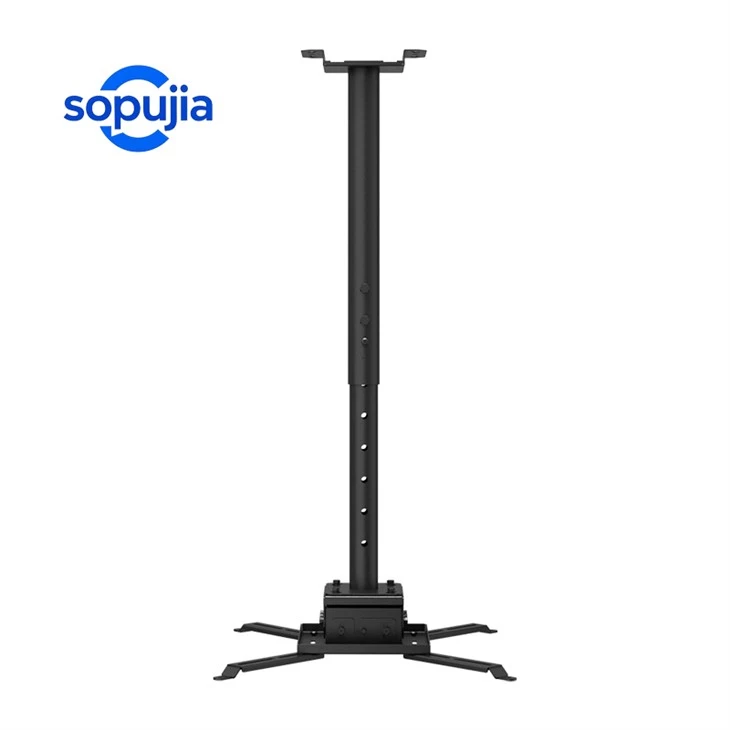
- Extra Long Projector Ceiling Mount: This extra-long projector ceiling mount is ideal for large rooms or high ceilings. It features a telescopic arm that can be extended up to [X] feet, allowing you to adjust the height of the projector stand easily.
- 2m Large Projector Hanger: This 2m large projector hanger is perfect for heavy-duty projectors. It features a sturdy steel construction and a maximum weight capacity of [X] pounds, ensuring that your projector is safe and secure.
- Projector Lift Ceiling Mount: This projector lift ceiling mount is a great option for those who want to hide the projector when it's not in use. It features a motorized lift mechanism that can be controlled remotely, allowing you to adjust the height of the projector stand with ease.
Conclusion
Adjusting the height of a home projector stand smoothly is an important part of setting up a home theater system. By following the tips and guidelines outlined in this blog post, you can ensure that your projector stand is properly adjusted and that you achieve the best possible projection experience. If you have any questions or need further assistance, please don't hesitate to contact us. We're here to help you find the perfect projector stand for your needs and to ensure that you're completely satisfied with your purchase.
References
- "Projector Mounting Guide," Projector Central, [Date Accessed]
- "How to Mount a Projector," Best Buy, [Date Accessed]
- "Projector Height Calculator," Calculator.net, [Date Accessed]


