


As a projector mount supplier, one of the most frequently asked questions I encounter is about the minimum distance between the projector and the mount. This is a crucial aspect that directly impacts the performance and functionality of your projection setup. In this blog post, I'll delve into the factors that determine this minimum distance and provide some practical guidelines to help you make the most informed decisions.
Understanding the Basics of Projection
Before we jump into the minimum distance, it's essential to understand how projectors work. A projector projects an image onto a screen or surface. The size of the projected image depends on two main factors: the throw distance (the distance between the projector and the screen) and the projector's throw ratio. The throw ratio is a specification provided by the projector manufacturer, which indicates the relationship between the throw distance and the width of the projected image.
For example, a projector with a throw ratio of 1.5:1 means that for every 1.5 feet of throw distance, the projected image will be 1 foot wide. If you want a 10 - foot wide image, you'll need a throw distance of 15 feet (1.5 x 10).
Factors Affecting the Minimum Distance
- Lens Design: Different projectors have different lens designs, which can significantly affect the minimum throw distance. Some projectors are designed with short - throw or ultra - short - throw lenses. These lenses allow the projector to be placed very close to the screen while still projecting a large image. For instance, an ultra - short - throw projector can be placed just a few inches from the screen and project a large - scale image. On the other hand, standard projectors usually require a longer throw distance to achieve the same image size.
- Projector Model and Specifications: Each projector model has its own set of specifications regarding the minimum throw distance. You can find this information in the projector's user manual or on the manufacturer's website. It's important to refer to these official sources to get accurate details for your specific projector.
- Mount Type and Design: The type of projector mount you choose also plays a role in determining the minimum distance. Some mounts are designed to be very close to the projector, while others provide more flexibility in terms of distance adjustment. For example, a Laser Projector Stand might have a specific design that allows for a certain minimum clearance between the projector and the mount, depending on its construction and intended use.
Practical Guidelines for Determining the Minimum Distance
- Refer to the Projector Manual: As mentioned earlier, the first step is to consult the projector's user manual. The manual will provide you with the manufacturer's recommended minimum throw distance. This is the most reliable source of information as it is specific to your projector model.
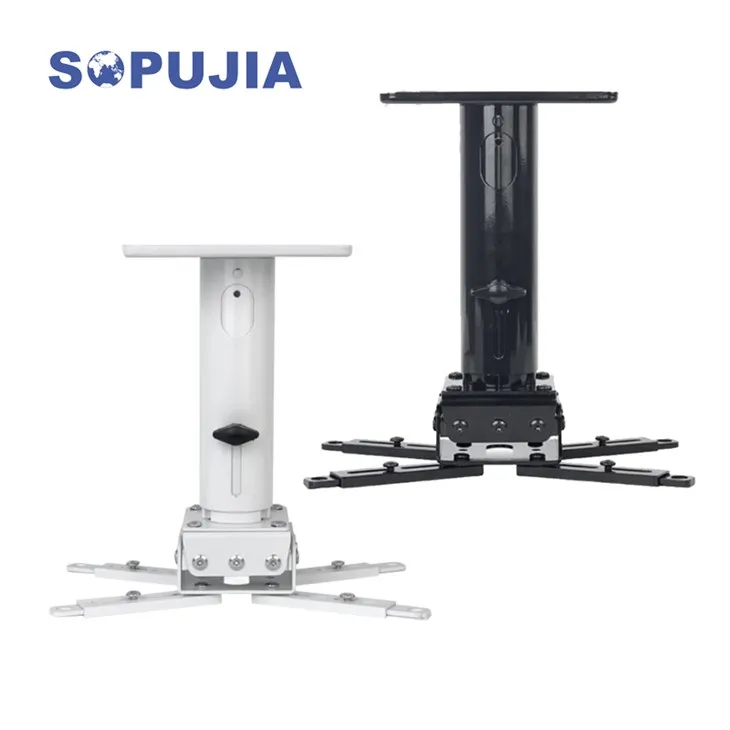
- Consider the Mount's Compatibility: When choosing a projector mount, make sure it is compatible with your projector in terms of the minimum distance requirements. Some mounts may have a minimum distance limitation due to their design or the way they attach to the projector. For example, a White Projector Mount might have a certain height or depth that affects how close the projector can be placed to it.
- Test and Adjust: If possible, set up a test environment to see how the projector and mount work together. Place the projector on the mount at different distances and observe the quality of the projected image. Look for any signs of distortion, uneven brightness, or other issues. Adjust the distance until you achieve the best possible image quality.
Importance of the Right Minimum Distance
- Image Quality: Maintaining the correct minimum distance is crucial for ensuring optimal image quality. If the projector is too close to the mount or the screen, the image may appear distorted, have uneven brightness, or suffer from other visual artifacts. On the other hand, if the distance is too large, the image may be too small or lose focus.
- Safety and Stability: The right distance also contributes to the safety and stability of the projection setup. If the projector is placed too close to the mount, it may not be properly secured, increasing the risk of it falling or getting damaged. A proper distance ensures that the projector is firmly attached to the mount and can operate safely.
Examples of Minimum Distances for Different Projectors
- Short - Throw Projectors: Short - throw projectors typically have a minimum throw distance of around 1 - 3 feet. These projectors are ideal for small spaces where you want to project a large image without having to place the projector far from the screen. For example, in a small meeting room or a home theater with limited space, a short - throw projector can be a great choice.
- Standard Projectors: Standard projectors usually require a minimum throw distance of 6 - 10 feet or more, depending on the model and the desired image size. These projectors are more suitable for larger spaces such as auditoriums or large classrooms.
How Our Projector Mounts Can Help
As a projector mount supplier, we offer a wide range of mounts to meet different needs. Our Large Projector Stand is designed to provide a stable and adjustable platform for larger projectors. It allows you to adjust the distance between the projector and the mount to ensure the optimal throw distance for your projector. Our mounts are also compatible with various projector models, so you can be confident that you'll find the right one for your setup.

Conclusion
Determining the minimum distance between the projector and the mount is a complex but essential task. It requires careful consideration of the projector's specifications, the mount's design, and the desired image quality. By following the guidelines provided in this blog post and referring to the official documentation of your projector, you can ensure that your projection setup works smoothly and delivers the best possible results.
If you're in the process of setting up a projection system or looking to upgrade your existing one, we're here to help. Our team of experts can assist you in choosing the right projector mount and provide you with detailed information on the minimum distance requirements. Contact us today to start a discussion about your specific needs and explore our range of high - quality projector mounts.
References
- Projector user manuals from various manufacturers.
- Industry research on projector technology and mounting solutions.


